


MAXHUB Whiteboard
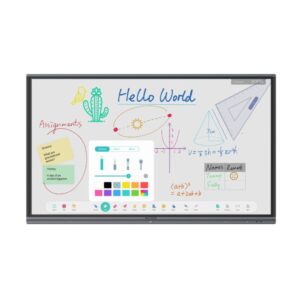
The built-in MAXHUB digital whiteboard software is integral to the MAXHUB corporate solution, offering enhanced, user-friendly collaboration capabilities.
Customizable Interface, Intuitive Interaction
|
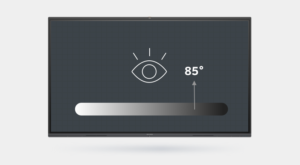
Comfortable customized UI creates
an easy writing experience The writing background, made to measure with 85° shades of grey, enables comfortable writing. Slim, flat and minimalist icon design incorporates visual clarity and decluttered interfaces to assist everyday creativity.
|
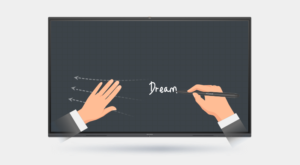
Write, drag or zoom naturally as if on a
piece of paper MAXHUB Whiteboard provides a smooth and familiar pen-and-paper-like writing experience. You can write with the stylus and drag or zoom the canvas simultaneously with the other hand. The design also comes with dual color when switching between hand and pen or pen nibs.
|
Responsive toolbar, there to grasp ideasIt is said that “the faintest stroke of ink is more powerful than the strongest memory.” Since the last thing you want is to let a good idea slip away, simply lift the stylus from a MAXHUB V5 to activate the toolbar and record fleeting thoughts instantly.
|
Swipe up to activate the Mini-WhiteboardA quick swipe up from the bottom of the bezel will activate the Mini-Whiteboard interface so that you can write down your ideas immediately during a brainstorming discussion. Need more space? Continue writing in MAXHUB Whiteboard.
|
|
Pressure-Sensitive Accuracy
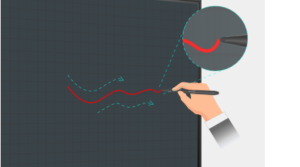
Pressure-sensitive technology empowers accurate calligraphy writingOn a MAXHUB Whiteboard, the thickness of the stylus can be adapted to the user’s writing speed even when using the passive pen. Strokes of drawing become bolder as you increase writing speed and pressure, thus offering pixel-perfect precision and unmatched versatility.
|
Intelligent RecognitionThe auto-recognition feature allows users to instantly convert graphics and forms into easily legible digital content without having to draw carefully or using instruments. This facilitates efficient discussion and enriches your writing and presentation tools.
|
 |
Ultra-Low Latency AccuracyInnovative infrared touch technology delivers a smooth writing experience and helps record your creativity in a flash. The writing accuracy is plus or minus 1mm, which ensures fine annotations.
|
Noticeable CollaborationWrite smoothly, and also differently. Ideal for comparative presentations, MAXHUB intelligent stylus SW13 featuring dual nib dual color, enables identifiable meeting records.
|
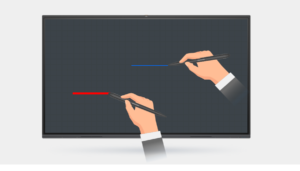 |
Presentations Come with Versatility and Convenience
Brainstorm Anytime, Anywhere
Voting is now faster with MAXHUB V5’s instant stickers. Simply scan a QR code on the screen to send stickers and easily tap and drag to sort your uploaded stickers.
Many Documents, One PageMAXHUB Whiteboard gives users the capability to import multiple documents or multimedia to the same page. From 4K videos to audio files, PPT files, PDFs, images, and more, you can play and display a wide variety of content on the same interface.
|
Diverse Content, Independent WindowsWith the MAXHUB Whiteboard, you can manage diverse content in a window-displayed style on the same page. Imagine playing videos while scrolling presentation slides. Seeing the content side-by-side, viewers can absorb information and take notes with ease.
|
Manage and Save Annotations
Users are empowered to slide or scroll the pages, take screenshots and import it all into Whiteboard for further discussion on imported PPT files. What’s more, one can transform one of the files to full-screen mode, then take notes and save the annotations within the file.
Recap Your Way
MAXHUB Whiteboard facilitates the wireless distribution of meeting recaps to all attendees, present or absent, while eliminating the clutter of handwritten meeting notes. Fresh ideas and annotations can be saved in real time, providing easy sharing access across all channels.
Scan and save under the same LAN |

Save to OneDrive & Google Drive |

Send via email |
Annotate Your Way
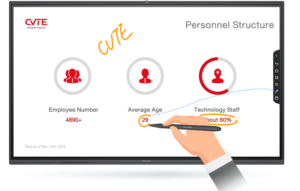
Annotation following presentationsMAXHUB Whiteboard includes a new user-friendly feature that can support user annotation on and within PPT files whether it is from screen sharing or file importation. Notes follow the pages even when you slide to the next page, enabling you to save all your annotations.
|
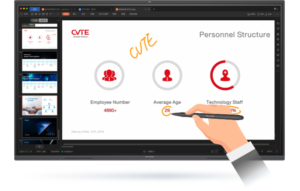
Annotate on any interfaceThe built-in sidebar empowers users to write on top of any interface. By simply clicking the pen icon, users can enjoy smooth writing anytime, anywhere – on any content displayed.
|
More Tools for Next-Level Brainstorming
|
Quick vote and rapid results
Tap at the sidebar to start a vote session. Tabulate results with a simple click.
|
Send stickers from mobile devices
This is an effective way to transform listeners into idea contributors, while also making your meetings more fun and engaging.
|
 |
|
|
Instant and wireless transfer from mobiles
Scan the QR code, upload the files from your mobile phones, and drag to Whiteboard for further annotation. It’s that convenient.
|
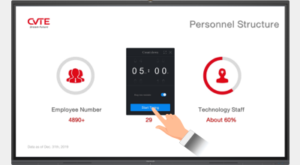
Timer: Another efficient add
Utilize the timer to set a 5-minute in-group brainstorm to promote creative thinking during a meeting.
|

Reviews
There are no reviews yet.